2206276 10 Multi Line Brushes Procreate XQNWXAG
BRUSH | 3 Mb
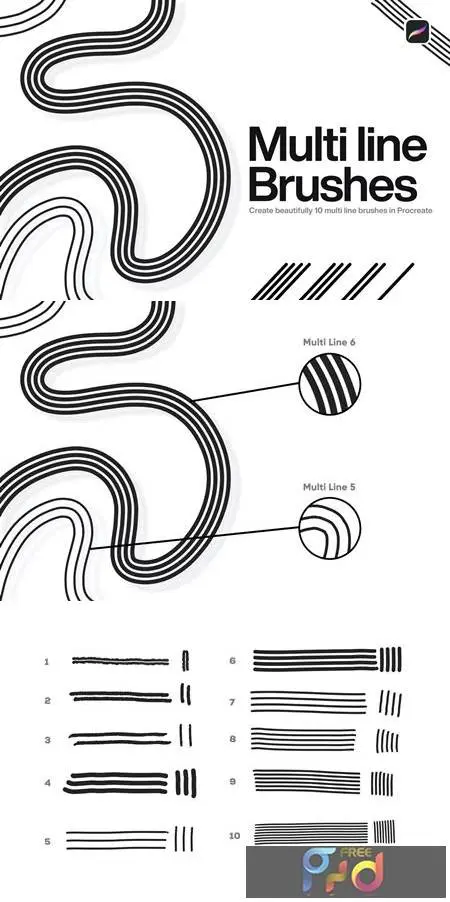
10 Multi Line Brushes for Procreate are great tools for Multi Line effect. Use your Ipad as you would paint with Multi Line brushes.
You will get:
- 10 Procreate Brushes for Multi Line effect
More Useful Tips & FAQ
Professional Tips & FAQ: Mastering Multi Line Brushes
Whether you are designing intricate lettering, retro typography, or detailed backgrounds, having the right tools is essential for a smooth workflow. Utilizing a multi line brush procreate set allows digital artists to generate parallel lines, rainbow strokes, and complex textures in a single swipe, saving hours of manual drafting.
- Tip 1: Streamline Shading: Use these brushes for cross-hatching and instant shading on character designs or architectural sketches.
- Tip 2: Adjust Streamline Settings: To get perfectly smooth parallel lines, increase the stabilization and streamline settings within your brush studio.
- Tip 3: Layering Colors: Lock the transparency of your line art layer to easily colorize individual strokes.
Frequently Asked Questions
- Are these brushes compatible with Adobe software? While this specific set is optimized for the iPad, designers often look for a multi line brush photoshop equivalent. We recommend checking our Photoshop brush category for desktop alternatives.
- Can I use this multi line brush procreate free resource for commercial projects? Yes, these versatile brushes are perfect for both personal artwork and professional client projects. Enhance your digital toolkit today!