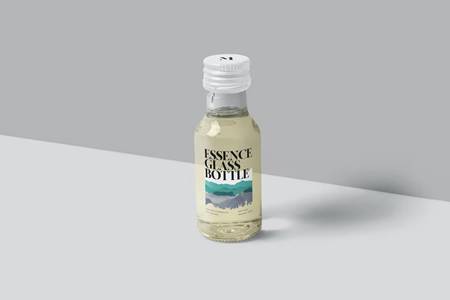
This Mockup includes 04 ITEMS with well-layered PSD file and this mockup also uses the smart-object feature which means that you can easily and quickly change the current design with your own just in a few seconds.
Feature:
– Easy and fast editing via smart objects
– Organized Layers and folders
– Good look for bright and dark designs
– Customizable background colors
– Adjustment light
– High resolution 4500x3000px
-300 DPI
What you get:
– 04 PSD File.
– PDF Guide
Note: Images or designs used in this preview are not included
Benefits of Using a Restaurant Menu Mockup
1. Visual Appeal: A menu mockup allows you to present your dishes in a visually appealing manner, enticing customers to try them.
2. Customization: You can customize the menu mockup to match your restaurant’s branding, creating a cohesive look across all your marketing materials.
3. Feedback: By using a menu mockup, you can gather feedback from customers or colleagues before finalizing your actual menu design.
Tips for Creating an Impressive Restaurant Menu Mockup
1. High-Quality Images: Use high-quality images of your dishes to make them look more appetizing and enticing.
2. Clear and Readable Fonts: Choose fonts that are easy to read and reflect the vibe of your restaurant. Avoid using too many different fonts to maintain a cohesive look.
3. Organized Layout: Arrange your menu items in a logical order, making it easy for customers to navigate and find what they’re looking for.
4. Branding Elements: Incorporate your restaurant’s logo, color scheme, and any other branding elements to create a cohesive look that reflects your brand identity.


orientation: Landscape
graphicTemplatesFileTypes: PSD,PDF
graphicTemplatesApplicationsSupported: Adobe Photoshop
dimensions: 4500,px,3000
colorSpace: RGB
resolution: 300,15,10
Additions: isLayered, hasDocumentation,
Creating a restaurant menu mockup can be a fun and creative process that allows you to showcase your dishes in the best light possible. By following these tips and making use of our mockup, you’ll be on your way to creating a menu that not only looks great but also helps drive sales and attract customers. So, what are you waiting for? Get started on your restaurant menu mockup today and watch your business thrive!
Download the Zip File: Simply click on the provided direct download link. Your browser will typically recognize that it’s a direct link to a file.
Extract the Files: Right-click on the zip file and select an option like “Extract” or “Extract Here” from the context menu. Alternatively, you can use file archiving software like WinZip, 7-Zip, or macOS’s built-in Archive Utility.